Tiny Solid: A Delightful Font for Creative Expression
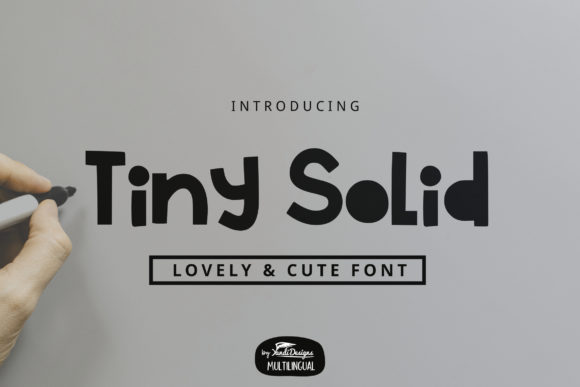
Tiny Solid is more than just a font—it's a visual experience. With its charming, childlike aesthetic, this display font brings a sense of playfulness and whimsy to any design project. Whether you're crafting a school assignment, designing a fun website, or creating a social media post, Tiny Solid adds a unique touch that stands out in the digital space.
What Makes Tiny Solid Stand Out?
At first glance, Tiny Solid might seem like a simple font, but it carries a lot of personality. Its rounded edges and soft curves give it a gentle, approachable look. This makes it ideal for projects where you want to convey warmth, friendliness, or even a bit of nostalgia. The font’s simplicity doesn’t mean it lacks character—on the contrary, it’s full of charm.
One of the most appealing aspects of Tiny Solid is its versatility. It works well across various mediums, from print to digital. For instance, it looks fantastic on posters, invitations, and children's books. Its playful nature also makes it perfect for branding projects that aim to appeal to younger audiences or those who want to evoke a sense of innocence.
But don’t let its cute appearance fool you—Tiny Solid is built with functionality in mind. Each letter is clearly defined, making it easy to read even at smaller sizes. This is especially important when using the font for educational materials or informational graphics where legibility is key.
When to Use Tiny Solid
Tiny Solid isn’t just for kids’ projects. While its name suggests a childish vibe, it can be used in a variety of contexts. For example, it’s great for creative campaigns targeting young adults or for branding initiatives that want to feel more personal and less corporate.
- School Projects: From report covers to classroom displays, Tiny Solid adds a decorative flair without compromising readability.
- Informal Design Ideas: Social media posts, greeting cards, and promotional flyers can all benefit from its friendly, approachable style.
- Branding: If your brand wants to feel more human and relatable, Tiny Solid can help create that connection with your audience.
- Web Design: When used sparingly, Tiny Solid can add a unique visual element to websites, especially in headers or call-to-action buttons.
However, it’s important to use Tiny Solid wisely. Because of its playful nature, it may not be the best choice for professional or formal documents. That said, it can still be used effectively in certain areas, such as headings or accent text, to add a touch of personality without overwhelming the overall design.
How to Incorporate Tiny Solid into Your Workflows
Incorporating Tiny Solid into your design workflow is straightforward. First, make sure you have access to the font through a reliable source. Many platforms offer free and paid versions of Tiny Solid, so it’s worth checking out different providers to find the one that suits your needs.
Once you’ve downloaded the font, you can install it on your computer or use it directly in online tools like Canva, Adobe Spark, or Figma. These platforms often provide a wide range of templates and design elements that work well with fonts like Tiny Solid, making it easier to experiment with different layouts and styles.
For web developers, integrating Tiny Solid into a website requires some basic knowledge of CSS. You can either download the font files and host them locally or use a web font service like Google Fonts. Either way, the process is relatively simple and can be done in a matter of minutes.
It’s also a good idea to test how the font looks in different environments. For example, check how it appears on mobile devices versus desktop screens. Ensuring that the font remains readable and visually appealing across all platforms is crucial for maintaining a consistent user experience.
Practical Benefits and Considerations
One of the biggest advantages of using Tiny Solid is its ability to stand out. In a world where many fonts are similar, having a unique typeface can help your content grab attention and leave a lasting impression. This is particularly useful for marketing materials or creative presentations where visual impact matters.
Another benefit is its adaptability. Tiny Solid can be paired with other fonts to create a balanced and cohesive design. For instance, using it for headlines while pairing it with a more traditional serif or sans-serif font for body text can create an interesting contrast that enhances readability.
However, there are a few things to keep in mind before using Tiny Solid. First, ensure that the font is compatible with the software or platform you’re using. Some older programs may not support newer typefaces, which could lead to formatting issues.
Additionally, consider the target audience. While Tiny Solid is undeniably cute, it may not be suitable for every demographic. If you’re designing for a professional or mature audience, it’s better to choose a more neutral or classic font. But if your audience is younger or more casual, Tiny Solid can be a great fit.
Finally, always remember to respect copyright and licensing agreements. Some fonts are available for free, while others require a purchase or subscription. Make sure you understand the terms of use to avoid any legal complications.
Real-World Examples and Recommendations
To get a better idea of how Tiny Solid can be used, take a look at some real-world examples. Educational institutions often use this font for student projects, as it helps make learning materials more engaging and visually appealing. Similarly, businesses that focus on creativity or innovation may incorporate Tiny Solid into their branding to reflect a more playful and approachable image.
If you’re looking for recommendations, start by experimenting with small sections of your design before applying the font to larger portions. This allows you to see how it interacts with other elements and whether it enhances or detracts from the overall composition.
Also, don’t hesitate to combine Tiny Solid with other fonts. Pairing it with something bold and modern can create a striking contrast that draws the eye and adds depth to your design. Just be careful not to overdo it—too many fonts can make your design look cluttered and unprofessional.
Ultimately, the key to successfully using Tiny Solid lies in understanding its strengths and limitations. By choosing the right context and pairing it with complementary elements, you can create designs that are both beautiful and functional.