Introducing Motif: A Minimalist Font for Modern Workflows
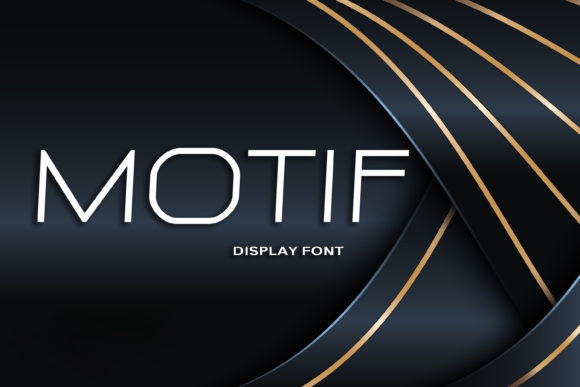
Motif is a thin and minimalistic display font that brings a fresh, clean aesthetic to any project or design. Its geometric shape and simplicity make it ideal for modern workflows where clarity and visual impact are equally important. Whether you're working on branding, content creation, or digital projects, Motif can help elevate your work without overwhelming the viewer.
The Role of Typography in Workflow Efficiency
Typography is often overlooked in favor of more obvious elements like color or layout, but it plays a crucial role in how information is perceived and processed. In today's fast-paced environments, readability and visual hierarchy are key. Motif, with its sleek and structured form, helps maintain focus and improves comprehension by reducing visual clutter.
When designing for digital platforms, especially those that require frequent updates or user engagement, a consistent and clear typeface can significantly enhance usability. Motif’s minimalist approach ensures that text remains legible across various screen sizes and resolutions, making it an excellent choice for both desktop and mobile applications.
Where Motif Fits in the Design Process
Motif isn’t just a decorative element—it’s a versatile tool that can be integrated at different stages of a project. Here’s how it fits into the broader process:
- Before a Project: Use Motif for initial sketches, wireframes, or mood boards to set a visual tone. Its geometric structure provides a strong foundation for creative direction.
- During Development: Incorporate Motif into prototypes or mockups to test how text will appear in real-world scenarios. This helps identify potential issues early in the design phase.
- After Completion: Apply Motif to final deliverables such as presentations, reports, or marketing materials to ensure a cohesive and professional look.
By using Motif throughout the workflow, you create a sense of continuity that aligns with modern design principles. It supports a streamlined approach, helping teams stay focused and efficient.
How Motif Integrates with Other Tools and Platforms
Motif works seamlessly with a wide range of design and productivity tools. From graphic design software like Adobe Illustrator and Figma to content management systems like WordPress and Squarespace, Motif adapts easily to different environments.
For developers, integrating Motif into web projects is straightforward. It supports common web formats such as WOFF, WOFF2, and TTF, ensuring compatibility across browsers and devices. This flexibility makes it easy to use in both static and dynamic websites, whether you're building a portfolio, landing page, or e-commerce site.
Additionally, Motif pairs well with other minimalist fonts and design systems. It complements sans-serif fonts like Montserrat or Roboto, creating a balanced typographic palette that enhances readability without sacrificing style.
Practical Tips for Using Motif in Your Workflow
To get the most out of Motif, consider these practical implementation tips:
- Use it for Headlines and Subheadings: Motif’s bold geometric shapes make it perfect for headlines and subheadings where attention needs to be drawn quickly.
- Pair with Complementary Fonts: While Motif is great on its own, combining it with a more readable body font can improve overall legibility and user experience.
- Test Across Devices: Ensure that Motif looks good on all screen sizes. Some devices may render fonts differently, so always test your designs in real conditions.
- Optimize for Speed: When embedding Motif on a website, choose the right format and optimize file size to ensure quick loading times, especially for mobile users.
- Keep It Simple: Avoid overusing Motif in every section of your design. Reserve it for key elements where its visual impact is most effective.
These strategies help maintain a balance between aesthetics and functionality, ensuring that Motif enhances rather than hinders your workflow.
Real-World Applications of Motif
Motif is not limited to design projects—it can be applied across various industries and workflows. Here are a few examples:
- Branding: Use Motif for logos, taglines, and brand assets to create a modern and memorable identity.
- Content Creation: Incorporate Motif into blog posts, social media graphics, or email newsletters to add visual interest without compromising readability.
- Education: Teachers and educators can use Motif in presentations, handouts, or learning materials to make content more engaging and accessible.
- Business Reports: For professionals and entrepreneurs, Motif can help simplify complex data visualization and improve the clarity of business reports.
- Personal Projects: Whether you're building a personal website, creating digital art, or managing a side hustle, Motif adds a touch of elegance to your work.
Its adaptability makes it suitable for both individual and team-based workflows, supporting creativity while maintaining efficiency.
Considerations for Long-Term Use
When choosing a font for long-term use, factors like preparation, compatibility, and consistency should be considered. Motif is designed with these in mind, offering a reliable and scalable solution for ongoing projects.
Ensure that Motif is properly licensed for your intended use. Many font providers offer different license types, so select one that aligns with your workflow and budget. Additionally, keep track of updates and changes to the font to maintain quality control and ensure continued support.
Regularly review how Motif integrates with your current tools and processes. As your workflow evolves, so too should your approach to typography. Stay open to new ideas and techniques that can further enhance your use of Motif.
Conclusion
Motif is more than just a font—it’s a powerful tool that can transform how you approach design, communication, and productivity. By integrating it thoughtfully into your workflow, you can achieve greater clarity, efficiency, and visual impact.
Whether you're a designer, marketer, educator, or entrepreneur, Motif offers a simple yet effective way to bring your ideas to life. With its clean lines and geometric structure, it supports modern workflows while maintaining a timeless appeal. Start exploring how Motif can enhance your next project and see the difference it makes.